Tutorial Espresso
Logic synthesis is the mapping of a logical expression (e.g. in SystemVerilog) to a digital circuit. The first part of this is often to simplify the logical expression. The program espresso can be used to calculate a two-level simplification of two-level expressions. Below follows a brief explanation how to work with espresso.
The program works originally in a MS-DOS window.
However, a graphical user interface (gui) exists, that makes it easier to work with it.
The graphical interface can be opened by starting espresso_gui, which is located in the map C:\Programs.
Then the window shown in Figure 1 will open.
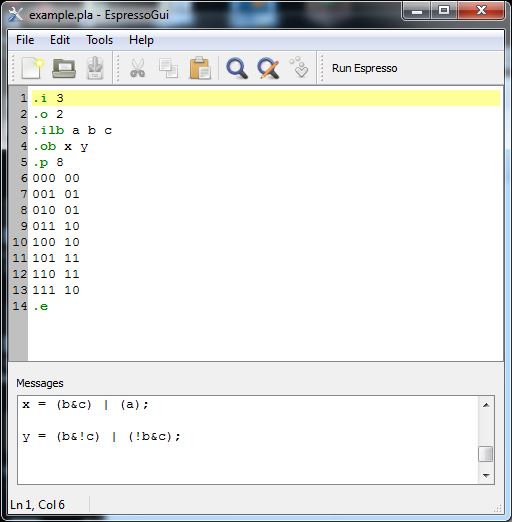
Figure 1:Graphical User Interface for Espresso
The upper frame is the input frame and the lower frame the output frame.
The input for espresso is a text file, see e.g. the file example.pla,
where the input expressions are written in the form of a truth table (.pla is in general conventions the file-extension for truth tables).
Create/edit such a file in the input frame or use File -> Open to open an existing file (e.g. file example.pla).
When using the key F9 or the button Run Espresso,
a two-level simplification will be executed and the result will be printed
on the output frame.
As an example, the following truth table
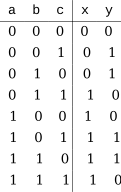
can be coded as input for espresso in the following way:
.i 3       # declare 3 input variables
.o 2       # declare 2 output variables
.ilb a b c # name the 3 input variables a, b, c
.ob x y    # name the 2 output variables x, y
.p 8       # after this there are 8 input combinations

000 00
001 01
010 01
011 10
100 10
101 11
110 11
111 10
.e         # mark end of input-file
Note that the related (not yet simplified) expressions for x and y are given by:
x = a'bc + ab'c' + ab'c + abc' + abc
y = a'b'c + a'bc' + ab'c + abc'
With the Run Espresso command, espresso will generate the following screen-output:
x = (b&c) | a
y = (b&!c) | (!b&c)
which is identical to
x = bc + a
y = bc' + b'c
This is indeed a proper two-level simplification compared to the original expressions.